



DAF ICAM Enablement Center
Wingman Onboarding Tool
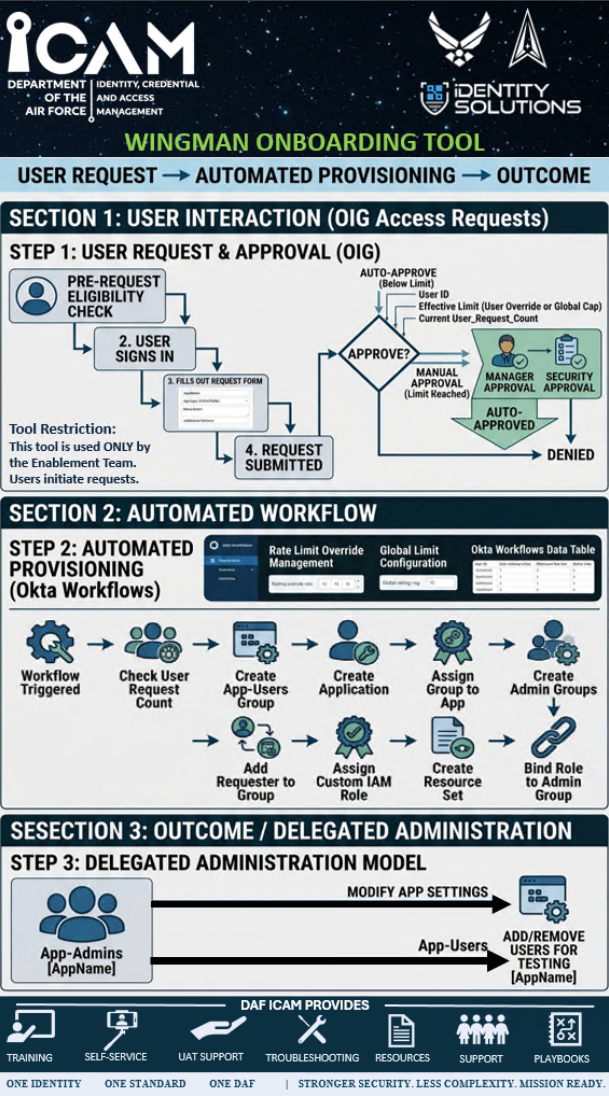
Wingman takes an application from a user request, through automated provisioning, to a delegated administration outcome. Requests are made through Okta Identity Governance (OIG) access requests, and Okta Workflows build the application, its groups and its administrator role.
How Wingman works
Tool restriction: The Wingman Onboarding Tool is used only by the DAF ICAM Enablement Team. Users initiate requests.
User request
The requester signs in and submits an OIG access request, which is approved automatically or by a manager and security reviewer.
Automated provisioning
The approved request triggers Okta Workflows, which create the application, its user and admin groups, and a custom administrator role.
Outcome
The application is handed over under a delegated administration model: App-Admins manage the application and its test users.
User interaction (OIG access requests)
The user request and its approval happen in Okta Identity Governance (OIG).
-
Step 1
Pre-request eligibility check
Before a request is made, the requester's eligibility is checked.
-
Step 2
User signs in
The requester signs in to Okta to start an access request.
-
Step 3
Fills out the request form
The requester completes the Wingman request form in OIG.
-
Step 4
Request submitted
The submitted request goes to the approval step.
Approval
-
Auto-approve (below limit)
The request is approved automatically when the requester is below their limit. The check uses the requester's User ID, their effective limit (a user override or the global cap) and their current User_Request_Count.
-
Manual approval (limit reached)
When the requester has reached their limit, the request needs manager approval and security approval.
-
Result
An approved request moves on to automated provisioning; otherwise the request is denied.
Automated workflow
An approved request is provisioned automatically in Okta Workflows.
-
Step 1
Workflow triggered
The approved OIG request starts the provisioning workflow.
-
Step 2
Check user request count
The requester's request count is checked against their effective limit.
-
Step 3
Create App-Users group
The App-Users [AppName] group is created.
-
Step 4
Create application
The application is created in Okta.
-
Step 5
Assign group to app
The App-Users group is assigned to the application.
-
Step 6
Create admin groups
The application's admin groups, including App-Admins [AppName], are created.
-
Step 7
Add requester to group
The requester is added to the application's group.
-
Step 8
Assign custom IAM role
A custom Okta administrator (IAM) role is assigned.
-
Step 9
Create resource set
A resource set is created to scope the role to this application and its groups.
-
Step 10
Bind role to admin group
The custom role and resource set are bound to the admin group.
Request limits
The Enablement Team manages the request limits the workflow applies:
-
Rate limit override management
Per-user overrides of the request limit.
-
Global limit configuration
The global cap that applies when a user has no override.
-
Okta Workflows data table
Each requester's request count and effective limit.
Outcome and delegated administration
The workflow leaves a delegated administration model in place.
App-Admins [AppName]
Modify the application's settings, and add or remove users for testing.
App-Users [AppName]
The users assigned to the application for testing. App-Admins add and remove them.
Support
For support with the DAF ICAM Enablement process, please email aflcmc.hnid.daficamenablement@us.af.mil.
Content last reviewed 2 November 2026. Next review due 31 January 2027.